Depth2STL and Obj2GLB
Two small open-source tools for getting 3D data where it needs to go.
 Eddie OffermannDeveloper
- Role
- Developer
- Areas
- Tools, VFX
Not every tool needs to be a platform. These two do one conversion each and are open source under the MIT license.
Depth2STL
Depth maps are everywhere: from depth sensors, from photogrammetry, and from monocular depth models that estimate depth from a single photo. Depth2STL turns one into a physical object, a relief you can 3D print or carve on a CNC machine.
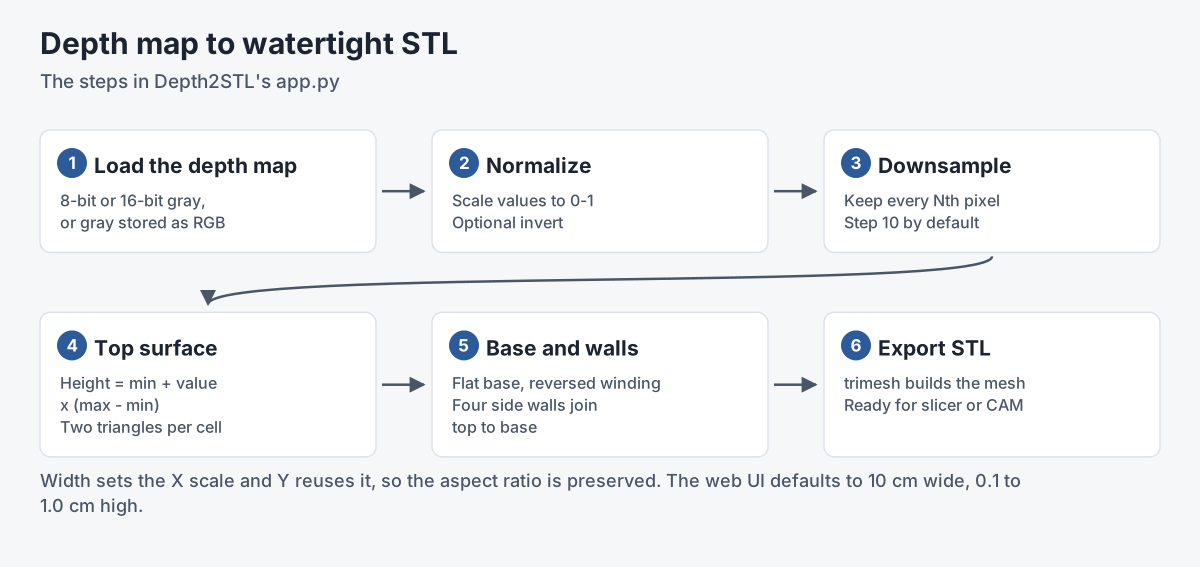
- It reads 8-bit and 16-bit grayscale images, including 16-bit depth disguised as an RGB image with equal channels, and can invert the values.
- You set the target width and the minimum and maximum heights in centimeters, and a downsampling step to control the mesh density. The aspect ratio is preserved.
- It builds the top surface from the depth values and closes it into a watertight mesh with trimesh, ready for a slicer or CAM software.
- It runs from the command line or through a Gradio web interface.
Obj2GLB
OBJ is the format many tools export, and GLB (binary glTF) is the format the web and most real-time viewers want. Obj2GLB is a PyQt5 desktop app for the conversion: drop the .obj, its .mtl and its textures into the window and click convert.

- It keeps the material and texture references by preserving their relative paths during conversion.
- It preserves vertex colors when the OBJ has them.
- The conversion itself is done by the Node.js obj2gltf tool, which embeds the materials and textures in the output.
- It writes GLB or glTF, converts a single file or a whole folder, and also runs from the command line.
GLB is also one of the formats BigBluePipeline sends to b2c3d with every publish.
Links
Sources
Related work
-

AuRA Avatar Generator
Customizable, photorealistic presenters for AI-generated video briefings.
-

b2c3d
Traditional 3D content creation, rebuilt with AI inside the tools.
-

BigBluePipeline
A VFX studio pipeline, rebuilt as the artist-side front end for b2c3d.
-

Mirada360 for Unity
A layered approach to 360 video in Unity.